01Request accessTell us about your app or site. We reply by email.
02Open your invite linkIt works for 14 days. Set a password of 8 characters or more.
03Create your postback secretUnder Postbacks. We never send a postback without one.
04Send a test postbackIt carries test=true, so your server can skip crediting it.
05Send one real user throughWith their own sub_id, then find it in Flight Recorder.
Advertiser
From sign-up to a live campaign
01Create your accountSign up, then add your app or site as a product.
02List the events you'll pay forEach one gets a key, such as level_25, and a price.
03Send a test event for eachTest events are free. Each one turns Verified.
04Add at least $50Submitting needs a $50 balance. Funds are non-refundable.
05Submit for approvalPublishers can run the campaign once our team approves it.
Network
From demo to your publishers' first offers
01Book a demoWe set up your network with you. From $500 a month.
02Sign in with the link from our teamOur team sends it once your network is set up.
03Add your publishersCopy each one's invite link. Links work for 14 days.
04Connect the Network APIPull offers with your ak_ key and add your postback URL.
02Quick fixes
Messages your users might see.
The exact titles a player sees when a tap can't go through or the wall can't show offers, what each one means and what you can do about it.
Players see these pages inside publishers' apps, not yours. A tap we refuse never reaches your store page, so it can't cost you anything.
2:06
AffiliateOS
This offer isn't available for your account
Go back and choose another offer.
2:06
AffiliateOS
This offer isn't available in your state
Go back and choose another offer.
2:06
AffiliateOS
This offer has ended
It is no longer available. Go back and pick another offer.
2:06
AffiliateOS
Download a game
This one isn't available right now. Go back and pick another game to start earning.
2:06
This offer is no longer available
Go back and choose another offer.
2:06
AffiliateOS
This offer could not be opened
Please try again later or go back and choose another offer.
Try again
2:06
This offerwall link is invalid or expired.
2:06
Earn pebbles
No offers yet
Check back soon for fresh inventory.
All OffersNew + TrendingMy Offers
Titles copied from the product on 29 Oct 2026.
After a tap
“This offer isn't available for your account”
Means
Our traffic checks refused this tap. The offer itself is still live.
Do
Don't coach users around it. If you think real users are being refused, send us a few click IDs with times.
After a tap
“This offer isn't available in your state”
Means
The offer doesn't take players from the US state we placed the tap in. The tap never reaches the advertiser.
Do
Send the player's state as state=TX on the Offer API, and offers that exclude it are left out of your list.
After a tap
“This offer has ended”
Means
The offer is gone. Links outlive offers, so taps from cached walls and saved lists land here.
Do
Refresh your offer list and drop offers that no longer come back from the API.
After a tap
“Download a game”
Means
This game isn't taking new players right now, usually because its budget ran out or it left the listing.
Do
Nothing to fix. The player picks another game; the offer comes back on its own if it's listed again.
After a tap
“This offer is no longer available”
Means
The advertiser's side would not serve this tap: capped, paused or out of budget. The page shows no brand name, since the player may come from any app.
Do
Nothing to fix for one tap. If it keeps happening on one offer, refresh your list: it may be capped for today.
After a tap
“This offer could not be opened”
Means
We couldn't reach the offer's link just then. The page offers a Try again button.
Do
Ask the player to try again in a minute. If one offer fails for many players, send us the offer ID.
On the wall
“This offerwall link is invalid or expired.”
Means
The launch was refused: a signed link was reused, older than 5 minutes or signed with the wrong secret, or an unsigned link opened a wall set to Signed.
Do
Sign a fresh URL on your server for every launch. To let simple links open the wall instead, email us with your wall ID.
On the wall
“No offers yet”
Means
The wall has nothing it can show this player right now, for their country and device.
Do
Check that the country and platform you launch with match the player. Send country every time: without it the wall can't filter by location.
Start from the symptom. Each row starts with the likeliest cause.
Start here
A postback never arrives
First check. Is the conversion in your report? If it is, check for a postback secret: publisher postbacks are never sent without one. Networks: check your postback URL is saved under Workspace settings.
/publisher/reporting/flight-recorder
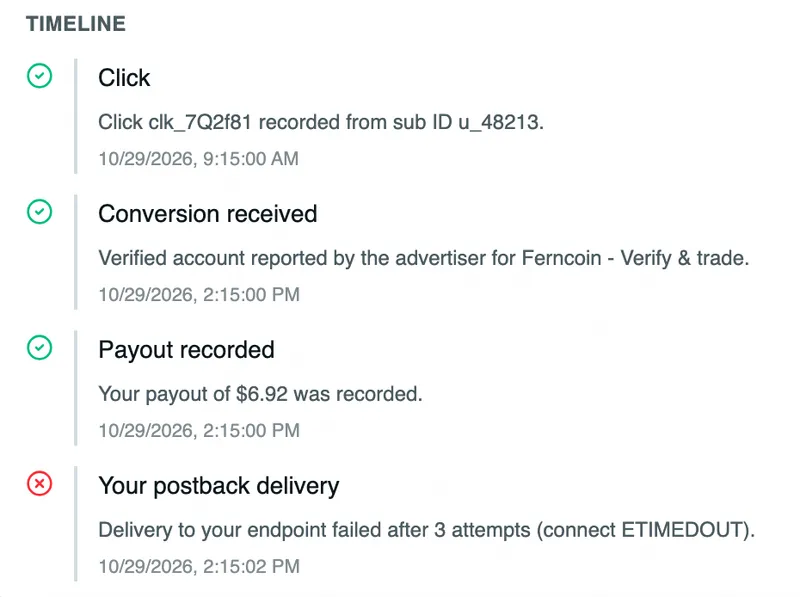
Timeline
Click
Click clk_7Q2f81 recorded from sub ID u_48213.
10/29/2026, 9:15:00 AM
Conversion received
Verified account reported by the advertiser for Ferncoin.
10/29/2026, 2:15:00 PM
Payout recorded
Your payout of $6.92 was recorded.
10/29/2026, 2:15:00 PM
Your postback delivery
Delivery to your endpoint failed after 3 attempts (connect ETIMEDOUT).
10/29/2026, 2:15:02 PM
Then open Reporting, Flight Recorder: each postback shows sent, failed or skipped_no_url, and its trace shows why.
First check. Open Event logs on the campaign and find the event. Events sent without a click ID, or with one that matches no tap, are logged as missing_attribution and never charged.
Event logs
Tidewater Putt · iOS
EventStatusCharged
level_25 Matched to clk_7Q2f81 approved$1.50
level_25 No click ID sent missing_attribution$0.00
chapter_1 Same eventId as 2:31 PM duplicate$0.00
Store afos_click_id when the player arrives, and send it as clickId on every live event.
Request and response samples for the Offer API, Top Offers Feed, Hosted Offerwall, postbacks, advertiser events and the Network API, checked against the API on , plus Markdown files your coding assistant can read.
One address for every question: hello@affiliateos.ai. Put the details from this list in your first message so we can find the click or conversion without asking you for them again.