Something for your panel to earn after a screen-out.
Offers for your panel, paid in your points, after a screen-out or when surveys run dry. We don't supply surveys.
Sign-up is by request. We reply by email.
- Harbor Blocks Install the game +210 pts
- Tidewater Putt Three steps in the game +305 pts
- Copper Kitchen Create an account +155 pts

Who it's for
For panels that lose members at the screen-out.
- Members earn points Your own points, credited by your own server.
- Screen-outs end sessions A member who doesn't qualify has nothing left to do, so they close the tab.
- Every member has an ID That ID rides on the click and comes back on the postback.
Not you? Buying sign-ups for your own panel? See research panels for advertisers
How it works
Placed where members would leave.
-
Choose the placement
After a screen-out, inside your survey list or when the list is empty. The Hosted Offerwall in a tab, or offers in your own layout from the Top Offers Feed.
Top Offers Feed, one rowGET /publisher/offers ?segment=top &country=US { "name": "Harbor Blocks", "effectivePayoutUsd": 4.2, "isPaidOnInstall": true, "trackingUrl": "…/click?…&sub_id={SUB_ID}&device_id={DEVICE_ID}" }IDs and amounts are examples from our fictional world. -
Send the member ID with the click
Put the member's ID in
sub_id. One ID per member, never a placement name: it's how you know whose points to add.Tracking link/click ?off_id=aff_hb40 &pub_id=pub_afos &partner_id=pt_8f2c41 &sub_id=u_48213IDs and amounts are examples from our fictional world. -
Credit points from the postback
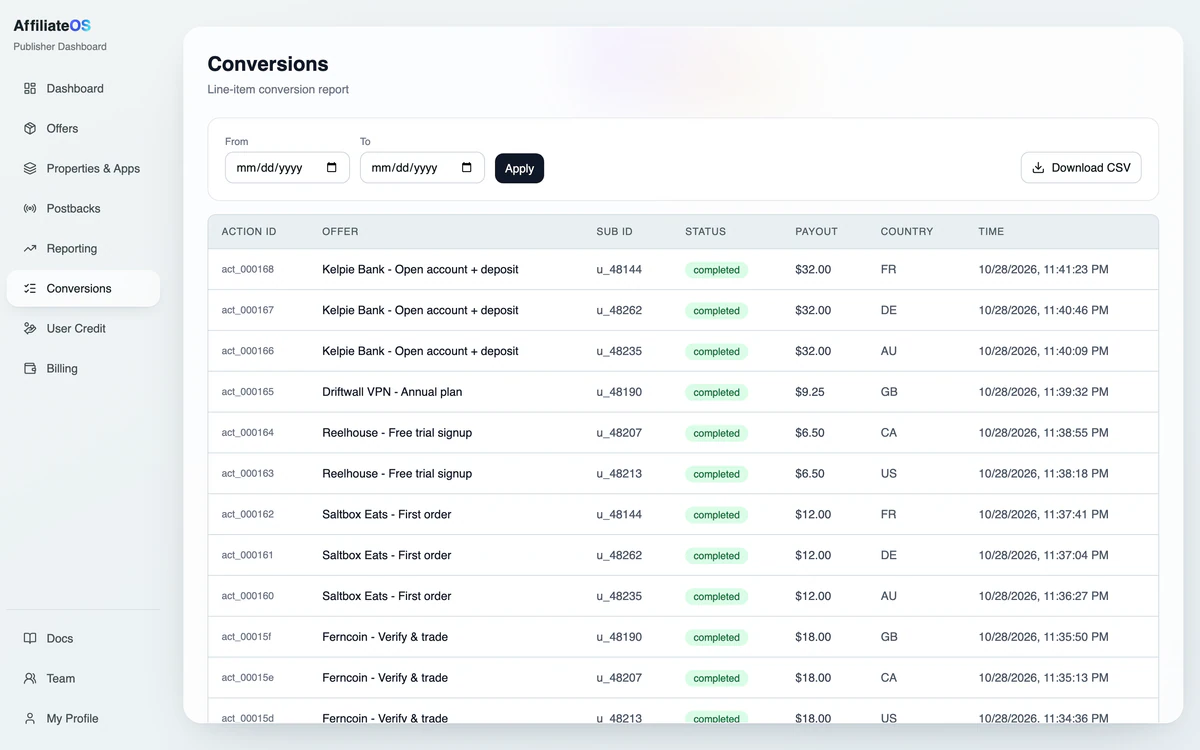
The postback carries the member ID and the payout. Filter the Conversions CSV by member ID, then trace any conversion in Flight Recorder by its action ID.
GET /publisher/offers
  ?segment=top
  &country=US

{
  "name": "Harbor Blocks",
  "effectivePayoutUsd": 4.2,
  "isPaidOnInstall": true,
  "trackingUrl": "…/click?…&sub_id={SUB_ID}&device_id={DEVICE_ID}"
}/click
?off_id=aff_hb40
&pub_id=pub_afos
&partner_id=pt_8f2c41
&sub_id=u_48213What your members see
Two more places offers fit.
The screen-out is one. Your survey list and its empty state are the others. Both show offers in your points, at 100 points to the dollar in this example.
- Streaming habits 12 min 80 pts Start
- Harbor Blocks Offer Install the game 210 pts Start
- Your last grocery trip 8 min 50 pts Start
- Phone plans 15 min 120 pts Start
- Copper Kitchen Offer Create an account 155 pts Start
Other ways to earn points
- Harbor Blocks Install the game +210 pts
- Tidewater Putt Three steps in the game +305 pts
- Copper Kitchen Create an account +155 pts
Money
What you get paid for.
Install offers pay you once, at install; later steps carry a member reward we don't pay you for. Event-paid offers list what each step pays.
Pay shapes that fit
- Pay per sign-up or trial
- Free sign-ups and trials. One payout per action.
- per action
- Pay per install (CPI)
- Games. One payout at install; later steps carry a member reward you credit.
- per install
- Pay per event
- Offers with priced steps list each step's payout.
- per step
Live now, in these categories
- Monopoly Go $9.49 per install
- Ancestry.com $6.00 per free-trial start
- RAID: Shadow Legends $8.82 per install
- Intuit Credit Karma $6.09 per sign-up
- Travel Town $5.89 per install
- myPurina: Install and Register $3.50 per sign-up


Tracking and money
Tracking and money work the same everywhere.
One conversion, in order: your user's tap, our click record, the advertiser's confirmation, then a signed postback to your server.
- Tap u_48213
- Click clk_7Q2f81
- Conversion advertiser confirms
- Postback signed
- Your server 200 OK
-
Click Tracking
Every tap is recorded with your user's ID and up to ten of your own values, sub1 to sub10.
How clicks are tracked -
Signed postbacks
Each one carries an HMAC-SHA256 verifier made with your secret. Without a secret, we don't send.
How postbacks work -
Fraud Defense
Suspect installs are held, unpaid, until reviewed. Traffic Quality lists the users we reject, with the reason.
How fraud checks work -
Reporting
Trace any conversion from tap to your server, or download every conversion as a CSV.
How reporting works
Before you start
Rules for panel traffic.
What's allowed, what's yours to handle and where we say no.
- Limit
We don't supply surveys. Offers sit beside your surveys, and your survey routing stays yours.
- Your job
If you resell panel answers to research buyers, check their rules on other rewards before you place offers.
- Default
Hosted walls leave out other survey panels and rewarded apps. The Top Offers Feed doesn't, so block any you don't want by ID with
block_offer_ids.
Do you supply surveys?
No. We supply offers: games, sign-ups and trials. Your surveys keep coming from wherever they come from today.
Will offers pull members away from surveys?
Only where you place them. You choose where offers show: after a screen-out, when the survey list is empty or anywhere else in your site or app.
Can the points match our existing rate?
Yes. On the Hosted Offerwall you name the currency, set how many make a dollar and choose the member's share of each payout. Where the advertiser sets a reward, members see that amount instead.
Can I see conversions per member?
Yes. The Conversions report lists every conversion with the member's ID, and you can download it as a CSV. Flight Recorder then traces any one of them to your server.
Can I run an offerwall instead of the feed?
Yes. The Hosted Offerwall is the other route: a wall we host, in your points, opened from a link, an iframe or a webview.
Will my wall show other panels?
Not by default. Hosted walls leave out survey panels and rewarded apps unless you ask us to show them. The Top Offers Feed doesn't filter them, so block those by ID with block_offer_ids.
Give screened-out members a next step.
Sign-up is by request. We reply by email.